Snow Effect

Sunday, December 7, 2014

Want To Know How To Block A Website In Any Windows Computer?

Reading and following the steps below is not encouraged by me. Any harm to your computer or network doesn't make me responsible for it.
_________________________________________________________________________________

Continue only if you agree the above.


Step 1: Windows Button + E.

Step 2: Double Click C:// drive or the drive in which the Windows OS is installed.

Step 3: Follow the path: C:\Windows\System32\drivers\etc

Step 4: Open Notepad as Administrator and Press Ctrl + O.

Step 5: Follow Step 3.

Step 6: Select file extension as All Files and open hosts file.

Step 7: Type as shown in the screenshot below.


Step 8: Save the file.

Step 9: The website will be blocked. #LikeABoss

Wireless Networking Precautions

Using Wi-Fi sounds cool but when you're connected to a public Wi-Fi or even a Wi-Fi which is secured but is being used by other unknown people too, there is a very high chance that they can see the files on your computer if you have not turned off file sharing. But I'm here to keep you safe with some precautions:

1. Make sure your computer has a hardware firewall.
2. Use public Wi-Fi for simple Internet browsing only.
3. Never use public networks for banking or to transmit credit card information.
4. Before joining any public network, look around for signs that advertise the name of the Wi-Fi network provided. Don't join any other networks that may also show up on your PC as available.
5. Don't use public networks to log in to anything personal, even Web-mail. Hackers are well aware that most people use the same passwords across everything from email to bank accounts.
6. Turn off shared folders to prevent hackers from uploading malware to your computer over a Wi-Fi network.
7. Change your Windows Wireless Network Connection properties from “Automatic Connection” (the default) to “On Demand” to prevent your computer from automatically joining unsafe networks.

Sources:


Cloud Computing

Cloud computing is computing in which large groups of remote servers are networked to allow centralized data storage and online access to computer services or resources. Clouds can be classified as public, private or hybrid.

In cloud computing, the word cloud (also phrased as "the cloud") is used as a metaphor for "the Internet," so the phrase cloud computing means "a type of Internet-based computing," where different services — such as servers, storage and applications — are delivered to an organization's computers and devices through the Internet. Cloud computing is comparable to grid computing, a type of computing where unused processing cycles of all computers in a network are harnesses to solve problems too intensive for any stand-alone machine.

As "Apple Inc." calls their cloud service iCloud:


Sources:

Internet Filters and Parental Control Softwares

Internet filters are software tools that can help monitor web content viewed on a particular computer or network. In the case of family safety settings, Internet filters can also help parents manage who kids can communicate with or how long kids can use the computer.


How setting Internet filters can help:
  1. Parents, guardians, or school administrators can protect kids from viewing inappropriate material as well as identify which websites kids can visit.
  2. Parents and guardians can block sites by content type or only allow access to certain sites.
  3. You can prevent unwanted, explicit sexual content from appearing in your search results.
  4. Businesses can block websites or programs that they don't want their employees to use at work.
  5. Internet filters can warn you about and block you from suspicious websites that might be fraudulent (also known as phishing filters).
  6. Internet filters can keep spam out of your inbox (also known as spam filters).
A top 10 list can be found here.


Sources:

Radio Frequency Identification (RFID)

http://wavemark.com/uploaded/items/banner_b907dcd8-3882-4ec5-bdfc-791a0458aeb9_.png
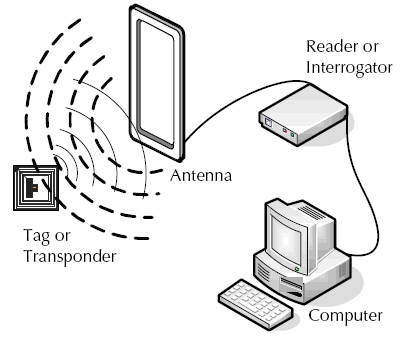
Radio-frequency identification is the wireless use of electromagnetic fields to transfer data, for the purposes of automatically identifying and tracking tags attached to objects. The tags contain electronically stored information. The chip typically is capable of carrying 2,000 bytes of data or less. Some tags are powered by electromagnetic induction from magnetic fields produced near the reader. Some types collect energy from the interrogating radio waves and act as a passive transponder. Other types have a local power source such as a battery and may operate at hundreds of meters from the reader. Unlike a barcode, the tag does not necessarily need to be within line of sight of the reader, and may be embedded in the tracked object. Radio frequency identification is one method for Automatic Identification and Data Capture.


How does a RFID system work?


A RFID system is made up of two parts: a tag or label and a reader. RFID tags or labels are embedded with a transmitter and a receiver. The RFID component on the tags have two parts: a microchip that stores and processes information, and an antenna to receive and transmit a signal. The tag contains the specific serial number for one specific object.


http://www.epc-rfid.info/wp-content/themes/gintinfo/images/how%20rfid%20works.png


Sources:

Digital Image Steganography

The word digital image describes a image file that can be stored electronically, in contrast to such a file in another medium, such as a photograph printed on photo paper. 

The term steganography comes from the Greek words meaning “to cover tightly” and “writing.” It refers to the practice or art of concealing a message in any medium. Digital image steganography refers to concealing a message in a digital image.

Some Digital Image Steganography tools can be found on:

One is "Hide in Windows" (screenshot below)


Another, "Pict Encrypt" for Mac's (screenshot below)

http://i.kinja-img.com/gawker-media/image/upload/18s02ohz1ghckpng.png

Computer Forensics


Computer forensics (sometimes known as computer forensic science) is a branch of digital forensic science pertaining to legal evidence found in computers and digital storage media. The goal of computer forensics is to examine digital media in a forensically sound manner with the aim of identifying, preserving, recovering, analyzing and presenting facts and opinions about the digital information.


Where Computer forensics has been used:

1. Intellectual Property theft

2. Industrial espionage

3. Employment disputes

4. Fraud investigations

5. Forgeries

6. Bankruptcy investigations

7. Inappropriate email and internet use in the work place


8. Regulatory compliance


To know more go to: https://forensiccontrol.com/resources/beginners-guide-computer-forensics/ or Google "Computer Forensics"

Sources: